November 14, 2013


This post will focus on the few informal tests I have run on the BCLmacro. I wanted to also present some example photos and write about using it in the field, but will save that for "Part III" because of the length of this article. Of course, I am far from qualified to rate this lens on a technical level and cannot perform tests like those you would find here, but I do have a background in science and have tried to apply the scientific method in my examples. One caveat is that I am on a seismic vessel which is basically a floating factory... we even have to wear hard hats ;) Besides the back and forth movement from being on a boat everything is CONSTANTLY vibrating. I thank the heavens for the image stabilization built into my EM5 on a daily basis. In addition, as stated in "Part I" of this series my BCL was malfunctioning before the conversion so you may get even better results =) The take home message is, digest these "tests" with a grain of salt. They are only meant as a guide to help you get started taking awesome photos with your newly modified BCL!

I. Dirty Ruler Tests


The first thing I did after putting the BLCmacro into action was to assess it's working distance. I was awed at how close I had to be to achieve focus, but the scientist in me wanted a number. My solution for testing this was to place a ruler at the base of my camera, slightly tilt it down and assess the "in focus" area.  Results of this test indicated that the working distance is about 7 cm and the DOF (in focus area) is about 5-7mm or roughly 1 cm. The photo below is a SOOC JPEG and not ideal to assess maximum sharpness because the iso equaled 1000 and shutter speed was 1/ (0.5*effective focal length) = 1/15. I have however provided a magnified view (not 100% crop) of the unedited RAW file to give a better idea of the focus at 6 vs 7 vs 8 mm. Again, this test was only done to give an indication of the working  distance and DOF, in the following section we look at optimal sharpness =)

Working distance
Magnified view
I also used my very tarnished ruler to gain a feel for the magnification of this lens.. My macro knowledge is quite limited, but it is my understanding that magnification is dependent on your sensor's width. If you have an 18mm sensor (like m4/3 cameras do) then you achieve 1:1 magnification if you are able to photograph something 18mm across. To test the BLCmacro's magnification, I taped my ruler to a thick sketch journal so that it was standing and then got everything in focus and took a photo (see schematic introducing this section). In the photo below you can make out 12 through 16 cm which equals about 40mm. This is nowhere near 18mm and my "rounded" estimate is about a 1:2 magnification (40mm/18mm = 2.22).

Magnification
In "Part I" I stated the magnification was roughly 1:3, but that was including the vignette (5mm on either side). I repeated the test in 2x crop (digital tele-converter) mode and was able to fit apx. 26mm into the frame. This backs up the idea that including the vignette the frame can "hold" 52mm (26 x 2). 

2x in camera crop (digital tele-converter)
To summarize:
Working distance: 7cm
DOF: ~1cm
Magnification:
                        Entire frame (52mm) = 1:2.88 
                        Usable (40mm) = 1:2.22
                        2x crop (26mm) = 1:1.44

You can also see that if you turn on your digital tele-converter the vignette and color fringing become negligible. This helps with framing (which I discuss more of in "Part III")

II. Money Shot


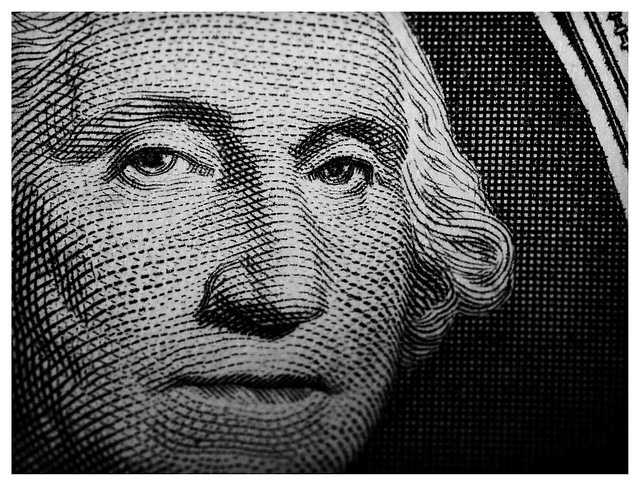
Testing the sharpness of the BCLmacro was inspired by the awesome photo above which was taken by one of my Flickr contacts, Dave Elmore. For this shot he used the EM5 and Leica DG Macro Elmarit 45mm f/2.8 ASPH. I know its crazy to be comparing the modified BCL to the Leica, (because the latter is highly regarded and designed for macro, 14 times the price, and triple the effective focal length) but I was amazed at the level of detail captured by Dave and wanted to see how the BCLmacro measured up. For this test I taped my cleanest dollar bill (I only have 3 with me offshore haha) to the sketch book mentioned above and photographed under ambient lighting and after the addition of a small continuous light source (diffused flashlight). Photos were then taken at the following shutter speeds :
  • 1/2*effective focal length (1/60)
  • 1/effective focal length (1/30)
  • shutter speed at which auto iso=200 
Before I shot these, I lined up Mr. Washington's frame (the fancy area surrounding him) in the middle of the live view screen and then moved my magnification box (at 7x) around his eyes. After moving my camera into focus, I pressed the body against my desk to reduce vibration and depressed the shutter button. Also to counter camera shake I had "anti shock" set to 1/8 second. Below are the results of this test and for each of the shutter speeds I present the JPEG version of the unedited RAW file and a 100% near center crop (where my intentional focus was).


1. AMBIENT LIGHT

1/60 sec, iso 3200
1/60 sec: 100% near center crop
1/30 sec, iso 3200
1/30 sec: 100% near center crop
1.5 sec, iso 200
100% near center crop

2. ADDITIONAL CONTINUOUS SOURCE

1/60 sec, iso 200
1/60: 100% near center crop
1/30 sec, iso 1000
1/30: 100% near center crop

1/6 sec, iso 200
1/6 sec: 100% near center crop
These results overall seem fuzzy and the best out of the bunch IMO was the shot taken at 1/60 seconds with the addition of continuous light. I then took the photo at 1/250 shutter speed and iso 200 using the kit flash in manual mode (1/25) to see how the BCLmacro performed in optimal conditions.

3. FLASH 

1/250 sec, iso 200

1/250: 100% center crop
This photo was most definitely sharper than than any of the others. I actually took a series of photos with the flash ranging from 1/8 to 1/32 and chose this as the most correctly exposed. The next few photos represent:

A) George cropped and processed to taste:


 C) George cropped to represent dimensions of Dave's photo, equal to: 1452 x 1117


D) 100% crop of processed photo


Although Dave's photo was not uploaded to Flickr at full resolution, it does not represent a crop. There is no doubt that in print his photo would look a lot better than anything the BCLmacro would produce. However I think that this underdog proved to be a fairly sharp, especially if you are able to take photos with an increased shutter speed. For this I recommend using some sort of flash. Elegant descriptions about the benefits of using flash for macro photography can be found in several places on Robin Wong's blog in addition to many other sites on the internet. The use of flash for the BCL macro is actually essential in practice because of the short 7 mm working distance... but before I get ahead of myself and start talking about "real world use" I want bring up another feature of this lens that surprised me.

III. Pass the Butter


After assembling the BCLmacro, I accidentally took a photo of some of the super computers on board the vessel I am on. I was immediately amazed at the quality of bokeh my Frankenstein of a lens produced! I have dedicated the next portion of this article to giving examples of bokeh with the super computers as my subject. Photos are SOOC JPEGs that were taken using bulb mode on the OMD EM5. Using bulb mode allowed to to preserve an iso of 200 and stop the exposure when I saw fit.

1/10 sec, iso 200
1.6 sec, iso 200
2.1 sec, iso 200
5 sec, iso 200
I think if properly exposed then bokeh is nice and smooth. also since the aperture is fixed all light sources come out as perfect circles. The next two photos are 100% crops from the 1.6 sec exposure above and represent the best and worst "bokeh balls" in that frame.

Best

Worst
Looking at this example and realizing that this lens was produced to exhibit NO bokeh at all, I think that it gets at least an A- in this department. As with any macro lens, it is important that bokeh is smooth and does not distract from the subject that is in focus. Here are some examples of what to expect with the BCLmacro (photos are processed to my liking):


IV. Smells Fishy

Besides the heavy vignetting and color fringing, I wanted to end this post with a very short note on distortion. If you have already or are planning on dismantling your BCL you will notice that the original back end of the lens element is curved like a fisheye. This translates into the photos taken with this lens... especially when you are photographing straight lines. I think it adds to it's strange character, but if you are not a fan, luckily, the center is not impacted. Also, correcting in Lightroom is an option. 


100% crop for good measure and to keep you pixel peepers entertained ;)
Working with the BCLmacro has been a wonderful roller coaster of trial and error... and I have only been using it for 4 days! As with anything, the more time you spend with something the more you learn about its properties. This post is already far too long so the next post will feature some tips for use and of course, more example imaged from the BCLmacro. Thank you so very much for dropping by. You are a trooper if you read all this text and deserve an electronic salute =)  Please feel free to ask any questions about the modification or any part of this post. 

Sam D.
One more bokeh example because I couldn't help it


November 13, 2013


Besides pure magic, ever wonder what is inside that tiny body cap lens (BCL) of yours?? Well.. I was led down the path to find out and along the way I discovered that a simple rearrangement of the internal lens element creates a "pseudo-macro"lens. I have estimated it has a 1:3 magnification ratio which is far from true macro capabilities (hence, "pseudo") and the rendering of images is, to put it nicely... unique. I don't suggest you go out and buy a body cap lens just to hack it up (because there are better alternatives to for cheap macro photography) and even if you already have one that is in working order its probably not worthy of sacrifice (especially if you enjoy using it).. BUT if you have abandoned your BCL, it has been rendered dysfunctional, or you really enjoy the lofi/holgaesque nature of the photos rendered (like I do!) then this may be a fun afternoon project =) I initially dismantled my BCL because during one of my daily photography sessions I noticed that it was excessively blurry around the edges. After cleaning it I saw no improvement, so I decided that since this lens is relatively cheap and easily replaceable that I was going to dismantle it and see if I could fix the problem.. Maybe there was something askew inside that was resulting in burred images??? 

Mysterious excessive blur
After disassembling and reassembling the problem did not correct itself and since I had gotten some pretty good panoramas from it, I figured my $50 was well spent in the time I had used it . I was planning on just tossing it and calling it a loss but then for some odd reason I thought of the technique used by many to turn old legacy glass into a macro lens using a cheap converter. Here the converter flips your lens so that the front elements face the sensor and the "mount end" is exposed to the elements. I thought to myself that the same concept should apply to the BCL, and hell, it was already malfunctioning so no harm in giving it a try! After some experimentation which entailed dismantling and re-arranging SEVERAL times (plus some modifications to the plastic) I finally came up with something that was usable.

BCLmacro
In order to accompish this, you will need:
  • Sacrificial body cap lens
  • Tiny screwdriver (small flat head worked best for me)
  • Rounded file or something else to make an existing opening larger (optional)
  • Q-tip for cleaning
  • Midget hands or lots of patience
Tools
If you want a rather significant vignette or do not want to lose the ability to protect the lens element then I suggest that you do not disassemble the front lens plate (part that has "OLYMPUS LENS 15mm 1:8.0" on the front). I have experimented with a couple of configurations, but once you modify the plastic via filing there is no turning back so it is best to see the examples below to get an idea of the types of photos each modification produces. All the examples below were taken using the kit flash (varying intensities) at 1/250 with an iso of 200. Raw files were then imported to LR4, re-sized when exported (1000 pixels to cut import time--I am offshore with bad internet), and re-sized using Blogger (X-large). 100% crops of RAW files were not re-sized at any point and no post processing (contrast, sharpness, clarity, etc) has been done on any of the files.

A. Simple lens element reversal without further modification: results in heavy vignette/ small degree of color fringing:


100% center crop

B. Removal of front lens plate completely: results in lighter vignette with the cost of increased color fringing


100% center crop

C. Filed down front lens plate: similar to removal of lens plate (B.), but front of lens looks better


100% center crop


D. Filed down internal platform and complete removal of front lens plate: almost no vignette but edges still exhibit color fringing


100% crop of in-focus area
E. Filed down internal element + filed down lens plate: similar to "C."

100% center crop
If you are interested in this hack disassembling the body cap lens should be your first move. You will end up with (all names made up; from left to right in photo below):
  • Mount, 4 associated screws, 8 tiny golden donuts (2 not pictured, lost)*
  • Internal platform (in picture turned right side up with red dot facing you) + front lens plate, three associated screws and lens cover (2 pieces)
  • Lens element + large spring
  • Lens element holder and three associated screws
  • Small spring (not pictured--lost)
  • Tiny metal ball (not pictured--lost)
* I have no clue what these were for :/

Parts
The order you disassemble the BCL is to: Detach mount --> Detach lens element holder --> Detach front lens plate. If you do this, you end up with a bare internal platform. Reassembly is not difficult as the BCL is wonderfully simple, but if you want to reduce the amount of vignette then you need to file down the internal platform (A) and/or the front lens plate (B). I ended up filing less than 1 mm off the internal platform and a little more than 1 mm off the front lens plate. Remember once you do this (and depending on how much you file away), the opening of the front lens plate will become too large to be covered using the sliding cover and you end up with two gaps. So if you still want to be able to close the BCL to protect the lens element then I suggest you do not remove the front lens plate and go with the "heavy vignette" option. Honestly I probably would have done this if I had know better, but once I filed down the opening it was too late. Also if you leave the front lens cover intact then there is no reason to file down the internal platform. The other plus side of not altering the plastic is that you can switch back to wide angle amazing if you get tired of the macro hack.

(A) Bare internal platform and file
(B) Front lens plate and file
After you have filed the internal platform and/or the front lens plate turn the internal platform upside down (red dot down) and place the lens element inside its holder with the small opening facing you (C).

(C) Lens element reversed and placed inside internal platform
Then attach the lens element holder to the internal platform using the three tiny screws provided (D).

(D) Lens element holder attached to internal platform
 If you have taken the front lens plate off for filing then the next step will be to attach it back to the internal platform using another set of three very tiny screws (E)

(E) Front lens plate attached to the internal platform
Finally line up the mount as pictured below (F), attach it to the internal platform using the four larger, but still very small screws and presto! you are done(G)!

(F) Lens mount and internal platform 
(G) Lens mount attached to internal platform

It really is insanely simple... especially if no filing is done. Take the BCL apart, flip the lens element, and put it back together. I ended up not needing either of the springs, the tiny ball,  or the two pieces of plastic that make the lens element cover. If you plan to use the lens cover then do not mess with the tiny spring and ball as these are needed for the lever to function. In this scenario, the only thing you will not use is the large spring. I am planning to write more about the details of how this lens performs in the very near future (probably post tomorrow). I am actually extremely surprised by the BCLmacro's sharpness.

Oh what a world!
The image quality is no where near that which you would get with a dedicated macro lens... it is still the body cap lens after all, BUT if all images were cookie cutter sharp, photography would be an extremely boring art form. I started out a big fan of the BCL (you can find a great collection of images from a variety of people here) and this modification has only added fuel to the flames of my love for this unique lens. If you do decide to try this out I want to state (even though it should be common sense), that I am in no way responsible for you ruining your body cap lens or injuring yourself during any part of this process. As always, innovate at your own risk. To help you decide whether this is something you are interested I will leave you with sample photos which have been processed to taste in LR4. I have created a Flickr group dedicated to this hack and if you are brave enough to convert PLEASE share your photos!!! Thank you for dropping by hope you have an amazing time with this strange (almost) macro =)

Sam D.


**********************************************UPDATE 12/12/2013**********************************************
As an alternative to dismantling your body cap lens, I found you can also use Meike extension tubes with an unmodified body cap lens as a macro alternative. See here for details. The extension tubes can also be used with the BCLmacro:

BCLmacro
BCLmacro +10 mm extension tube

BCLmacro Sample Photos:


Some photos look great with the heavy vignette.. especially in B&W


Considering what this is... Bokeh is surprisingly good


If photo is cropped, vignette and color fringing are negligible
P.s. The working distance of the BCLmacro is approximately 7 cm so you have to get in really close. BUT you can effectively use the kit flash to counter the shading you will experience at this proximity.. Also the DOF is about 1 cm so working is magnify mode is your best bet. More on this in tomorrows post.

If you live in, or are traveling to Florida and would like to schedule a photo-shoot, I am currently offering portrait services in and around Central Fl. Check out more of my work at www.samgoldphotography.com
 
© 2012. Design by Main-Blogger - Blogger Template and Blogging Stuff